
TL;DR
- Yes. Qwen 3 Coder Next + Opencode CLI shipped a working local-first app (LMS Log Explorer) from spec to prototype.
- Performance was usable for real workflows (median ~37 tok/s, P95 ~70.5 tok/s), but prompt processing dominated total time.
- Best use case: Running everyday coding tasks in the background to save on your rate limits. Use SOTA cloud models when you need faster iteration on harder tasks.
Does Qwen 3 Coder Next Make Local Development Viable?
The beginning of 2026 has been wild for model announcements!
We had Kimi K2.5 drop in January, Qwen 3 Coder Next dropped just 2 weeks ago, and a couple days ago we rolled out the red carpet for MiniMax M2.5. Needless to say, the benchmarks are flying around the internet, and as usual they are looking better than ever. But one thing that really piqued my interest was some details I saw for the Qwen 3 Coder Next model.
Qwen 3 Coder Next is an 80 billion parameter, mixture of experts (MoE) model, that uses about 3 billion active parameters during inference. More interestingly, this model was going head-to-head with Claude Sonnet 4.5 on SWE-Bench Pro Performance benchmarks. This was surprising to me given the size of the model. If true, it would mean that Qwen 3 Coder Next would be one of the first models that could run on my local setup and be used for meaningful coding tasks.
If you’re like me, you notice most of the benchmarks that get pushed out with new model releases are fluffy marketing material at best, and often just lies at worst. The real test is giving a model a spec and asking it to develop a full product from scratch.
All this leads up to the question of the week:
Can Qwen 3 Coder Next actually ship a real app, locally, start to finish, using a coding tool like Opencode CLI?
My Test Rig
- Mac Studio M3 Ultra, 96GB RAM
- LM Studio Server
- Qwen 3 Coder Next [6Bit] [Full 262,144 Token Context Window]
- Opencode CLI [MCPs: Context7]
The Model
You probably noticed I am running a 6 bit quantization of the model here. If this is your first time hearing about quantization, then there are probably some much better articles to catch you up on the specifics. But at a high level, quantization is a way to reduce the size of a model by using fewer bits to represent the weights. This can make a model run faster, but it also means that the model will be less accurate.
To visually show you why this is important, here is a table of the MLX model sizes for the quant variants of Qwen 3 Coder Next:
| Quantization | Model Size |
|---|---|
| 8bit | 85 GB |
| 6bit | 65 GB |
| 4bit | 45 GB |
Our Mac Studio is definitely up for the task and can technically run an 8bit quant version of the model. However, this runs into MacOS system limitations for memory allocation and doesn’t leave us enough room for a full context window. So, 6bit quantization is the best option for us with our current Mac Studio configuration.
Build A Spec!
First, like all my projects, I created a detailed spec for what I wanted the model to build. The idea was to build a web app that could run locally, and be used to inspect and evaluate the logs for LM Studio Server which are notoriously annoying to read and analyze. While I was at it, I also wanted to build in features to evaluate the quality of the models running on the server. It was important that it captured metrics like prompt processing time, tokens/sec, and tool usage. Finally, I wanted the ability to audit the prompts that were being sent to the model by the agent.
You can check out the full spec in our GitHub Repo here.
Note: Towards the end of the project, I went off the rails and yolo’d a few additions that were not in the original spec like fancy graphs, client detection, and an optional AI renaming feature. This is important as I want everyone to understand when they review the spec that it may not represent the end state of the app in the Github repo.
The Tech Stack
The next step was to define a tech stack for the project. Typically I like to use my boilerplate repo for new projects, but it is mostly used for larger applications made for scaling in the cloud which is too much for a small app like this.
I decided to go with a simpler stack:
- Next.JS
- Typescript
- Tailwind CSS
- Shadcn UI Components
- SQLite (local index/cache and settings persistence)
I did this for two reasons, first to give Qwen 3 Coder Next a fighting chance to ship a real app, and second to keep the project simple.
Coding Agent
Now, typically my primary coding agent is Codex CLI. It is super powerful and of course uses closed source SOTA models from OpenAI. However, since we are using Qwen 3 Coder Next, it made more sense to use the opensource project, Opencode CLI. I had heard a lot of great things about the tool, and it seemed like a perfect fit for our test here. So I went with it.
The App That Qwen Built
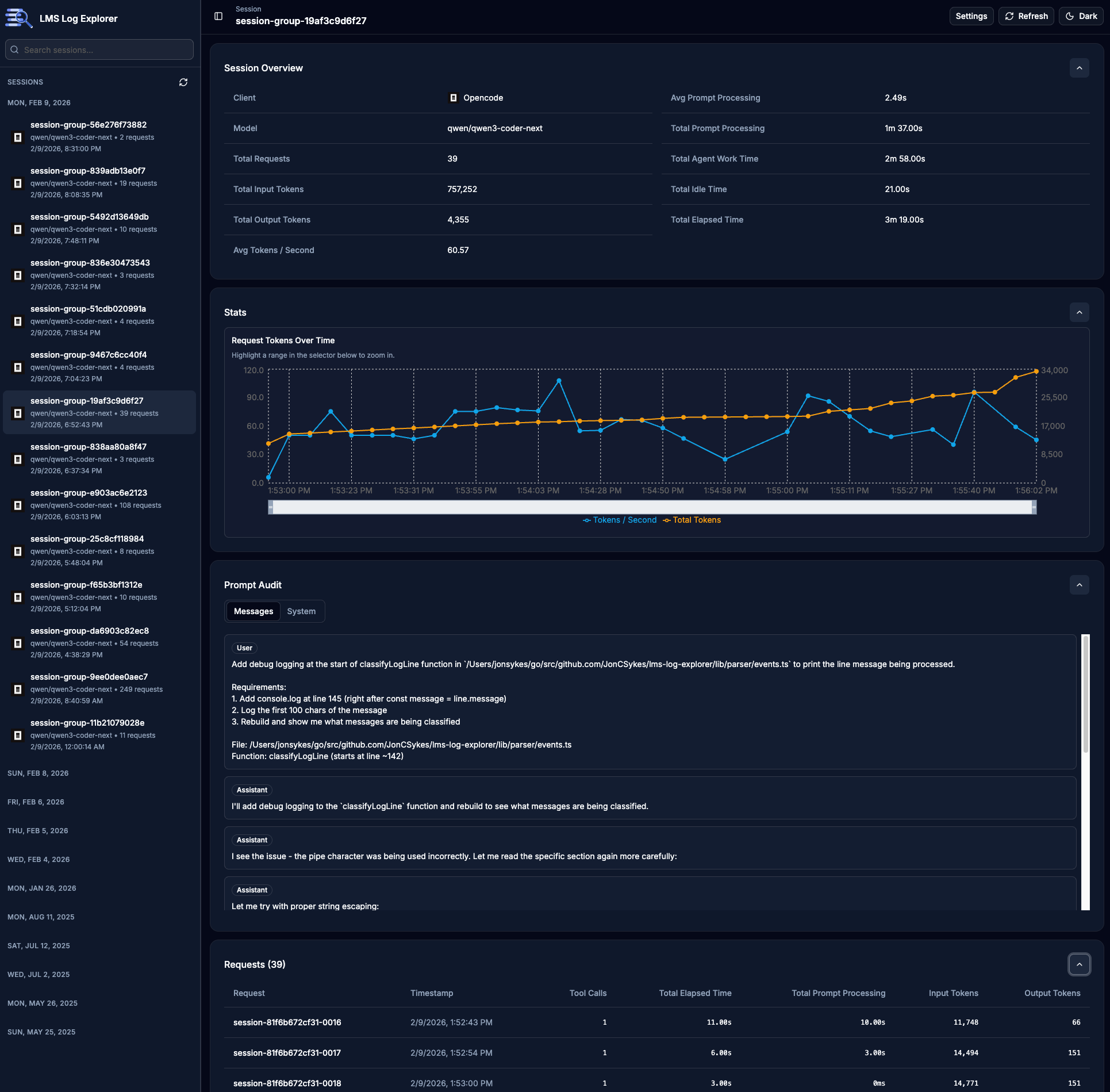
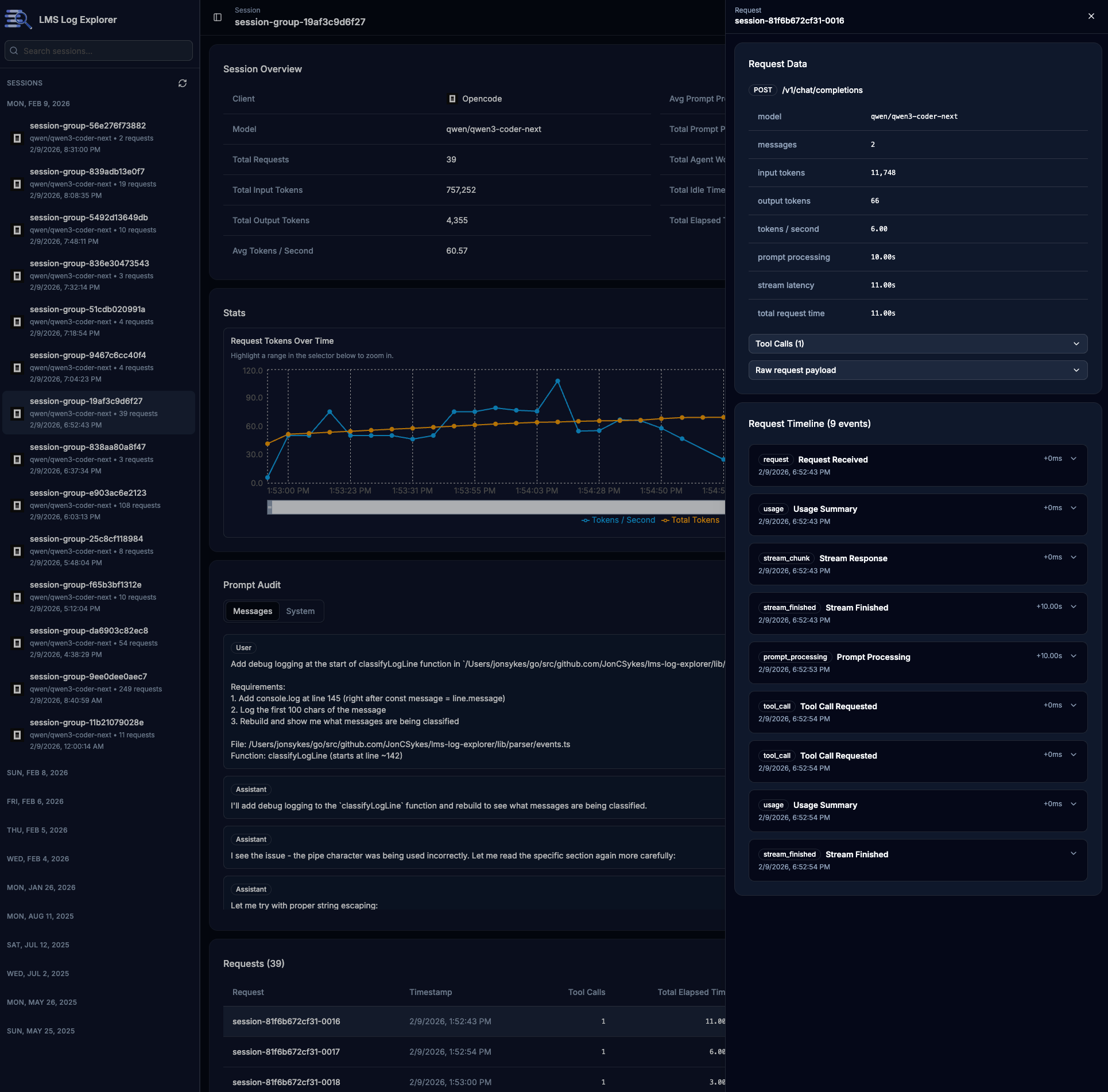
LMS Log Explorer is a local web app for exploring LM Studio server logs to perform prompt auditing and local model evaluation.
LMS Log Explorer (Github) - MIT License
Yes, I made the model build its own auditor. 😆
At a high level, it does four things:
- Parses LM Studio logs (including multiline JSON chunks).
- Correlates request/stream events into request sessions.
- Computes performance metrics (tokens, prompt processing, latency, tokens/sec).
- Renders everything in a usable dashboard (session sidebar, stats, prompt audit, detailed request view, event timeline).
Screenshots!!!
How did Qwen 3 Coder Next perform?
Overall, Qwen 3 Coder Next performed pretty well. It was fast, responsive, and stayed true to the spec. There were rough patches when we were debugging complex issues that forced me to dig into the code and give it better guidance, but I believe that only happened twice through the entire dev cycle.
I am very used to Codex performance, which is noticeably much faster than this local setup. However, for simple apps and tasks I think it’s worth saving your Codex/Claude Rate Limits and letting Qwen 3 Coder Next run in the background.
I am pretty sure what you guys really care about are the numbers, so here they are.
All numbers below were pulled from the local SQLite index generated from LM Studio server logs and our new app.
Dataset Snapshot
- 77 February log files indexed (733.12 MB total)
- 1,653 requests parsed (from 2026-02-04 through 2026-02-09)
- Model:
qwen/qwen3-coder-nextfor all parsed requests - Request payloads contain Opencode markers throughout the dataset
Notes on the dataset:
This is a single-environment local benchmark (one workstation, one model family, one agent workflow).
The February dataset reflects active build days (2026-02-04 → 2026-02-09) rather than a full 28-day continuous run.
Metrics are derived from LM Studio server logs and reconstructed sessions; malformed or incomplete log segments are handled best-effort.
Token Metrics
When we analyze the token metrics, we can see that this workload was context-heavy. Median input context was 108k tokens with P95 at 229k. It was long-context, iterative, multi-file agent work. At first glance, this looked like a case where prompt caching should have helped prompt processing.
Update (2026-02-16): Based on follow-up debugging, this appears to be at least partially caused by a cache-efficiency bug in the LM Studio/MLX path, not just workload shape. Tracking issues:
| Token Usage | All Reqs |
|---|---|
| Input | 177,517,413 |
| Output | 346,304 |
| Total | 177,863,717 |
| Input Tokens | Per Req |
|---|---|
| Average | 112,996 |
| Median | 108,349 |
| P95 | 229,215 |
| P99 | 257,908 |
| Output Tokens | Per Req |
|---|---|
| Average | 220 |
| Median | 101 |
| P95 | 825 |
| P99 | 1,972 |
Performance Metrics
Breaking down our performance, local throughput was strong enough for real coding tasks. The median throughput of 37 tok/s and P95 of 70.5 tok/s felt usable for long sessions, especially considering how quickly our context window grew. This was the most exciting for me, finally being able to use the expensive Mac Studio I bought a year ago. 😄
Prompt processing is where most of our overhead lives. Prompt processing consumed ~440 minutes versus ~185 minutes of response time. In other words, context ingestion is the bigger tax over output streaming. I initially attributed that mostly to missing prompt caching, but the current evidence suggests cache efficiency is likely degraded by the LM Studio/MLX bug noted above. Treat these prompt processing numbers as a worst-case read for this stack until those issues are resolved.
| Prompt Processing | |
|---|---|
| Average | 16.60s |
| Median | 1.00s |
| P95 | 97.00s |
| P99 | 410.00s |
| Response Time | |
|---|---|
| Average | 7.00s |
| Median | 3.00s |
| P95 | 24.00s |
| P99 | 53.00s |
| Tokens/Sec | |
|---|---|
| Average | 40.57 |
| Median | 37.05 |
| P95 | 70.50 |
| P99 | 86.00 |
Tool Call Metrics
Tool use was the default behavior, not the exception. Over 92% of requests included tool calls (bash, read, edit, write, glob). This
just means the model was able to leverage the full power of the agent, which is super exciting for a model of this size. 🔥
| Metric | Value |
|---|---|
| Requests with at least one tool call | 1,526 (92.32%) |
| Total tool calls | 1,656 |
| Avg tool calls / request | 1 |
| Avg tool calls / request (tool-using only) | 1 |
Top tools by call count:
bash(943)read(329)edit(191)write(66)glob(58)
Time Spent End-to-End
- Total Response Time: 185.12 minutes
- Total Prompt Processing Time: 439.70 minutes
- Combined Observed Model Work: 10.41 hours
Final thoughts
So… Can Qwen 3 Coder Next actually ship a real app?
Absolutely!!! I was able to build a working prototype in just a few coding sessions. It took a lot longer than a SOTA model would, but for the price of free, I was able to build something that is really useful. I am excited to see what the community does with it.
Moving forward, I highly recommend using Qwen 3 Coder Next for local development, especially for smaller tasks that can run in the background. Use your SOTA models when you need faster iterations or to solve harder problems.
Let’s wrap it up with a quick cost analysis. If we ran this same workload through a private model like GPT 5.2 Codex, the estimated API costs would be:
- Cached input: 142,013,930 × $0.175 / 1M = $24.85
- Non-cached input: 35,503,483 × $1.75 / 1M = $62.13
- Output: $4.85
- Total with caching: ~$91.83
That said, the basic Codex $20/mo plan could likely handle this entire project within your weekly rate limit, so the real savings over a subscription are modest.
Where local really shines is privacy. Your prompts, code, and context never leave your machine. For some workflows, that alone is worth the tradeoff.
What’s Next?
If you haven’t heard the buzz about Openclaw, then my next write-up might interest you. I’ll be exploring how to improve the cost-effectiveness of the popular personal AI assistant by using Qwen 3 Coder Next as its primary model. The plan is to only use Codex/Claude/Gemini for specific tasks. If you are interested, keep an eye out on X/Twitter @joncsykes.